













Skip to content

Four core components. One platform. Complete and modular.

Soev.ai takes AI from experiment to controlled production. We deliver the whole platform, from interface to infrastructure. And it is modular: you can replace every component around the core with your own.

Diagram of the platform. In the middle the four core components. Around them the modular components: interface at the top, models and gateway on the left, connectors on the right, infrastructure at the bottom, and guardrails and observability all around. Choose a component for the explanation.

The four core components

[01]

Data & indexing

The route from source to answer in four steps. One: documents come from the source systems, in any file type, with the permissions per document. Two: processing tailored to each file type, with parsing, OCR, chunking and enrichment. Three: the indexes, a semantic index, a knowledge graph (graph RAG) and the permissions. Four: search, from question through hybrid search and reranking to a passage with its source, with the permissions of the user enforced.

Every file type searchable: parsing, OCR, chunking and enrichment with dynamically generated metadata. Custom pipelines per file type and task, on our open-source framework for high volumes.

[02]

Search

A search query returns a passage from a document, with the source down to the page and the part that was used highlighted. A passage the user has no permissions for is not shown.

Hybrid search with reranking across large, messy collections. Permissions follow the source and are enforced on every search.

[03]

Agents

The log of one agent run as a timeline: question received, sources searched, proposal drafted, paused for human approval, approved, carried out and recorded.

Agents per use case, in the systems where people already work. Every run is an immutable log of what the agent saw, decided and did. With human-in-the-loop: pause, review, resume.

[04]

Evaluation & optimisation

Schematic chart of the score per version of an agent. A dotted line is the release threshold: the score of the version that is live now. Only a version that scores at or above the threshold goes live.

Preview
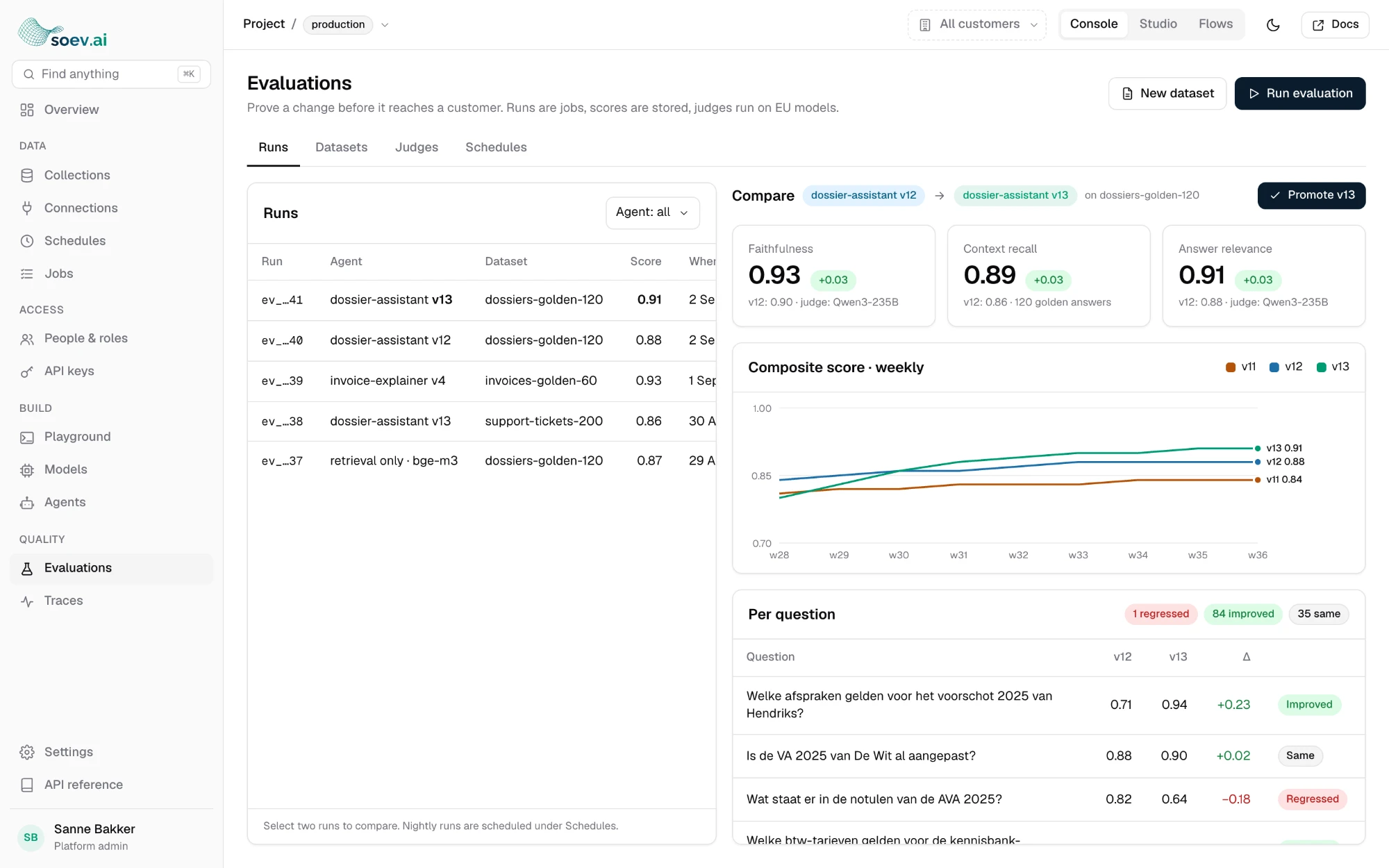
Design of the soev.ai Console: the Evaluations screen with a list of runs, a comparison between two versions of an agent and the score per question.

Every agent tested on your data with a fixed set of questions with a known correct answer. We optimise prompts and settings automatically, with DSPy and GEPA, and a new version only goes live if it scores at least as well.

Frontier quality, without frontier costs.

With our harness, a small open model can do the work you would otherwise need a frontier model for. We tune it to your data and your task: quality goes up, consumption goes down.

Tuned to your task

Schematic chart of quality and consumption per task. A frontier model sits at the top right: high quality, high consumption. A small open model starts lower and reaches the same quality in four steps, with much lower consumption.

  1. Small open model, not yet tuned.
  2. Search and context tuned to your data.
  3. Prompts optimised automatically with DSPy and GEPA.
  4. Tested on your benchmark, and only then live.
Schematic. Every version is measured before it goes live.

The modular components

We deliver all of them, so the platform is complete. If you would rather use your own interface, gateway, models or infrastructure, you connect those instead of ours.

Interface

Our workspace, or no separate interface: then the AI lands in Outlook, your CRM or your own software.

Models and gateway

Our gateway, or your own LLM proxy. We mainly use open-source models, and connect any other model you want to use. Routing per use case and risk profile. Switch models without rebuilding.

Connectors

Microsoft 365 and Google Workspace as standard. Reusable: case management systems, Confluence, council information systems. Every connector is a separate block.

Infrastructure

Kubernetes-native, Haven+ compliant. An isolated stack per customer.

Guardrails and observability

Prompt injection detection, optional PII masking, grounding check. Traces, replay, and energy per call.

Source systems we connect

  • SharePoint
  • Teams
  • OneDrive
  • Outlook
  • Google Drive
  • Confluence
  • Case management system
  • CRM

In the making

  • Exact Online
  • Nmbrs

For those who want to start right away

Chat with knowledge bases, assistants, a prompt library and source citations down to the passage. With a PowerPoint, document and Excel builder that uses your own templates, and an Outlook connector.

Illustration of the workspace: a chat in which a question is answered with numbered source citations, and a source card showing the document, the page and the passage that was used.

Illustration of the builder: on the left a prompt and the chosen template, on the right a presentation built in your own house style.

In development

Everything in one admin environment

We are building the soev.ai Console: knowledge bases, connectors, permissions, models, evaluations, traces and costs in one place. After that come a no-code agent builder and an SDK and CLI for developers. We develop this together with our customers and partners. Want to help shape it?

Preview
Design of the soev.ai Console: the Evaluations screen with a list of runs, a comparison between two versions of an agent and the score per question.

Open source and ownership

The framework is open source. Your data and whatever is set up specifically for you remain yours. You can move without rebuilding.

Curious how this works on your data?

How a first call goes

  1. [01]
    You tell us what you are running into

    Which systems, which data and which rules.

  2. [02]
    We show how it works for others

    With the measurements to go with it.

  3. [03]
    Together we decide what phase 1 can be

    One use case, with a benchmark as the yardstick.

45 minutes · online or on site · no obligation